MCP toolsets for customer support teams

Give every support agent an MCP toolset scoped to their role, with team instructions built in.

Your team is using Claude and ChatGPT alongside the helpdesk. Toolbelt connects your helpdesk, CRM, issue tracker, internal docs and your own APIs once, then lets support ops decide which tools each role gets and how the AI should use them. Every agent connects with their own permissions, in whichever AI client they already use.

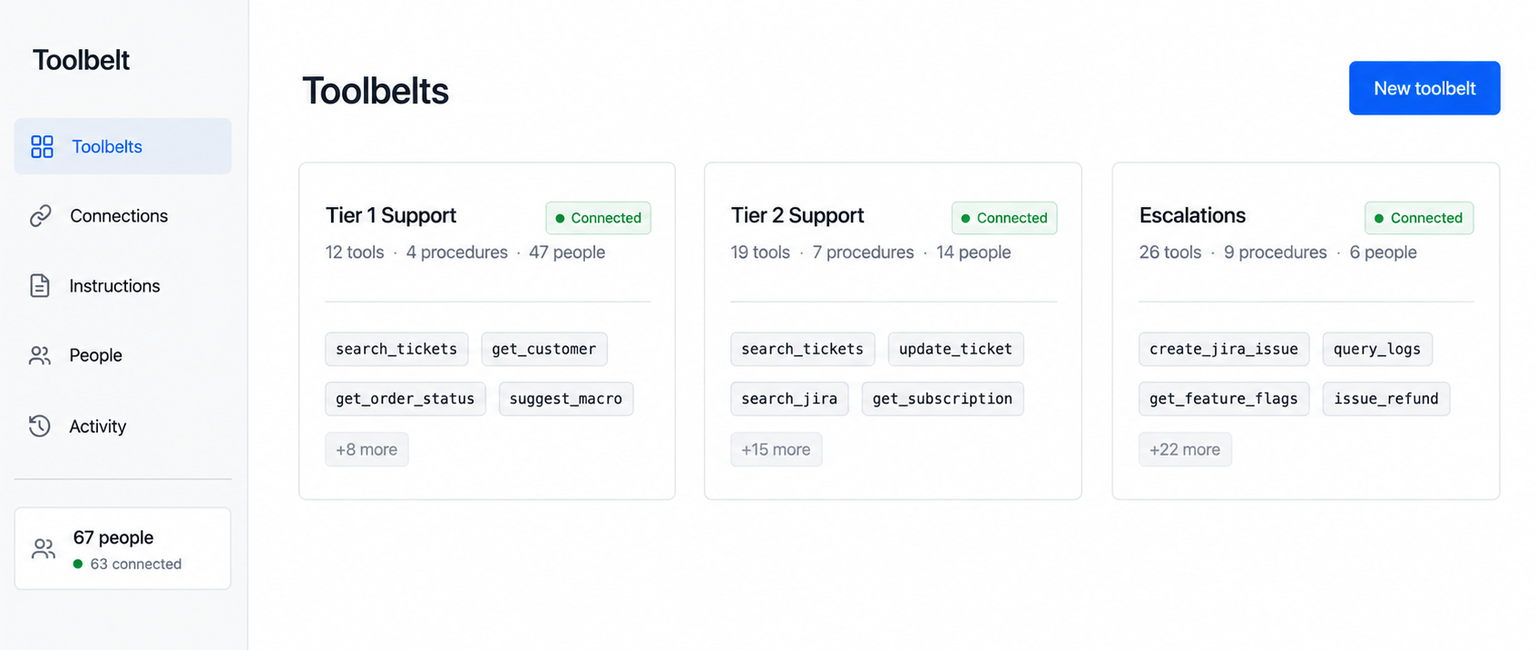
The Toolbelts admin console listing three role cards — Tier 1 Support with 12 tools and 47 people, Tier 2 Support with 19 tools and 14 people, and Escalations with 26 tools and 6 people — each with example tool chips and a green Connected pill.

From the team behind the Zendesk MCP server used by hundreds of support teams. Works with Claude and ChatGPT. Your agents' own permissions, not a shared admin key.

The problem

In Zendesk you decide what every support agent gets. In Claude, you decide nothing.

Support ops exists so the front line has what it needs. Inside the helpdesk that's years of accumulated work: macros, views, triggers, forms, the help center, internal documentation, role permissions. A new agent joins and everything is already there, scoped to what they do. Nobody hands them a blank screen and wishes them luck.

Then the team starts working in Claude, and support ops has nothing.

No way to say tier 1 gets these tools and escalations gets those. Agents either have no access to your systems at all, or access to all of them through somebody's admin token. Your Confluence has four thousand pages and about forty worth trusting, and the AI cannot tell the difference any better than a new starter can. Your knowledge team has already written down how all of this works. None of it reaches the AI.

So the front line uses it badly, or doesn't use it, or the two most technical people build their own setups and nobody else benefits.

"Everything you set up for your team in Zendesk, none of it comes with them into Claude."

The team whose entire job is preventing exactly this has no lever to pull.

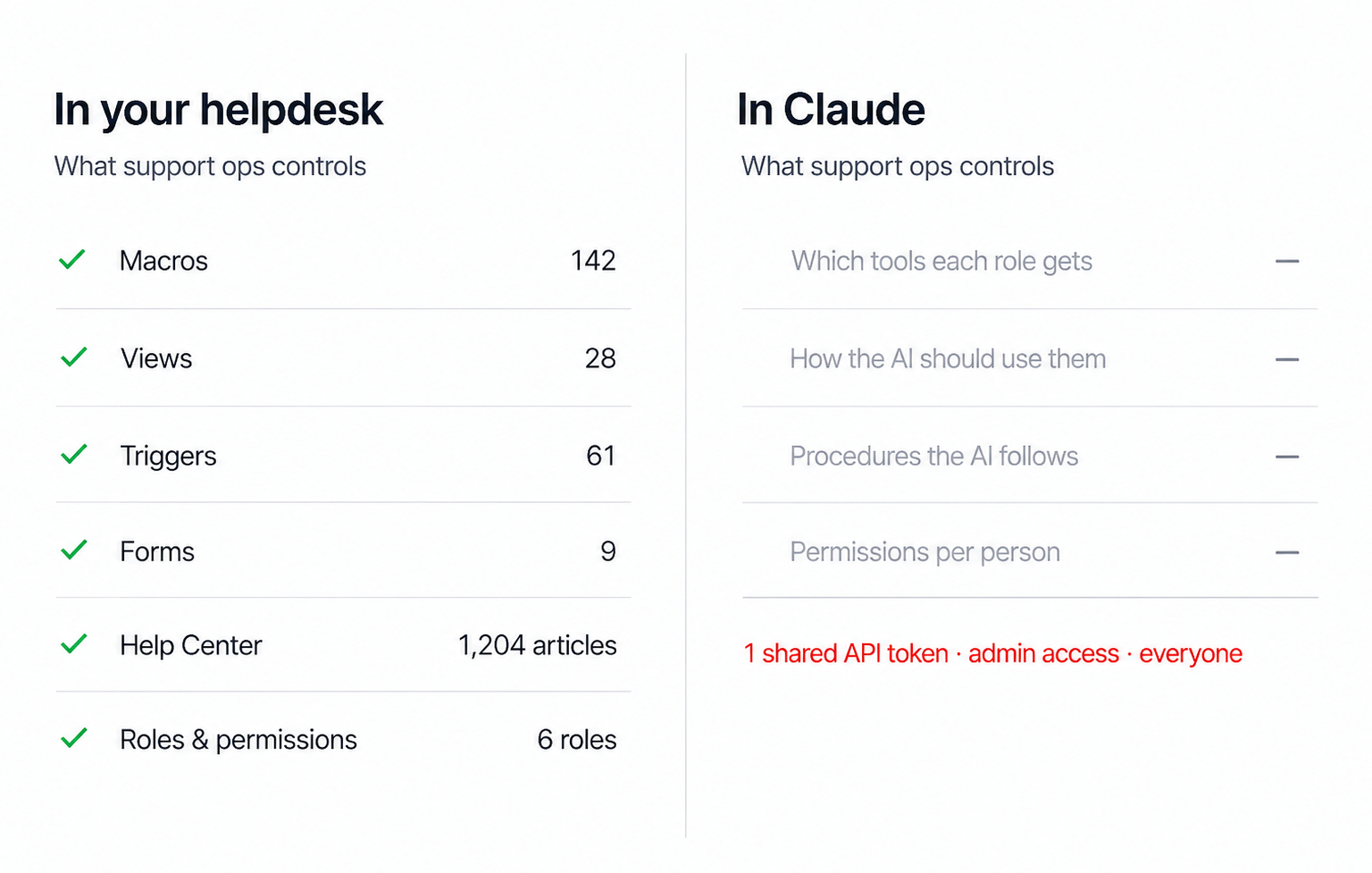
A two-panel comparison: “In Zendesk” lists admin-controlled items with counts — macros, views, triggers, forms, help center articles and roles — while “In Claude” shows tools per role, instructions per tool, procedures and permissions per person all as em-dashes, with a red line reading one shared API token, admin access, everyone.

The solution

A toolbelt is the tools a customer support role needs, plus the instructions for using them.

Toolbelt gives support ops the same control outside the helpdesk that you already have inside it. You connect your systems once. Then, for each role on your team, you decide two things: which tools that role can use, and how the AI should use them.

What you decideExample
The toolsWhich of your connected systems a role can reach, and which specific actions they can takeTier 1 can look up an order. Only Tier 2 can issue a refund.
The instructionsHow the AI should use each tool, in your words"When searching Confluence, use the Support and Product spaces only. Ignore anything archived."
The proceduresMulti-step jobs the AI should do your way, every time"To file a bug from a ticket: use the SUP project, include the account ID, reproduction steps and the customer's plan tier."

Each agent gets one connection. It carries their role's tools, their own permissions in every connected system, and your instructions. They open Claude or ChatGPT, and it's already there.

What's in it

Six things Toolbelt does.

1. The AI follows your team's procedures, not whatever each agent typed.
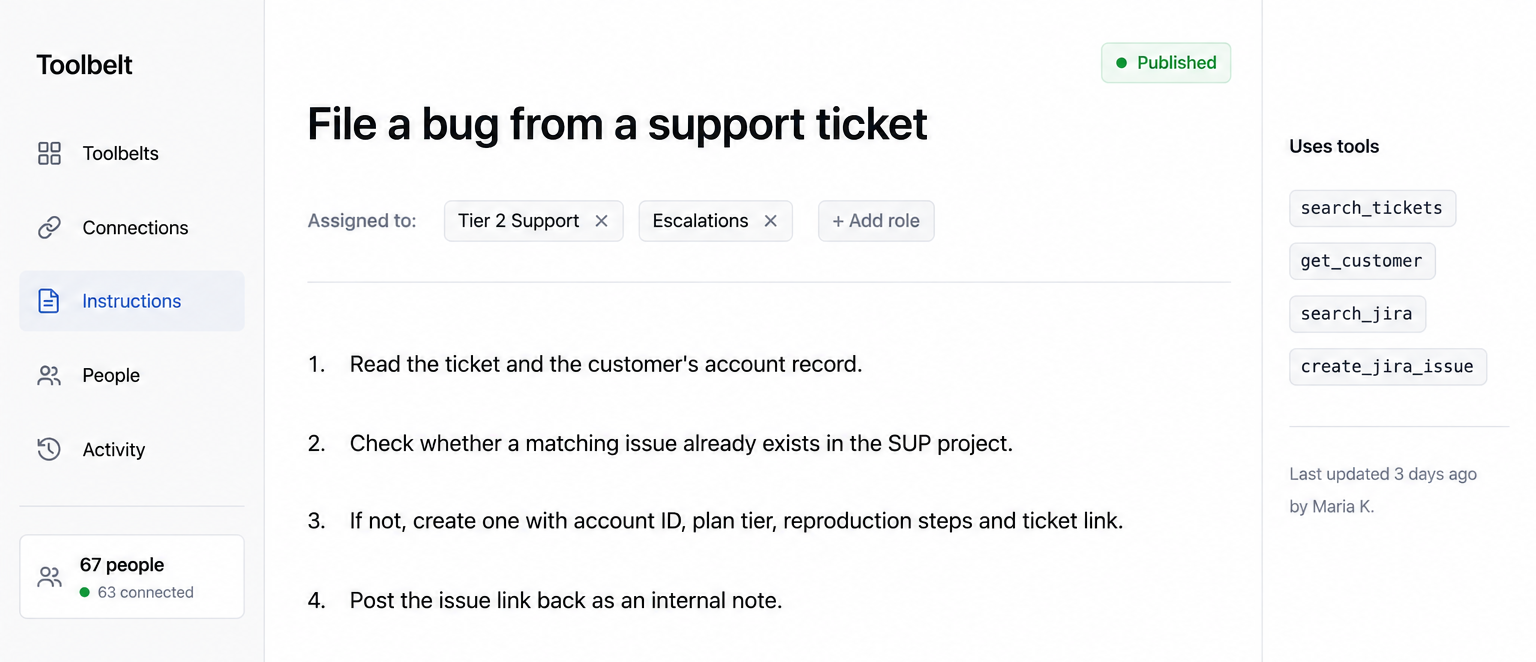
A procedure editor titled “File a bug from a Zendesk ticket”, assigned to Tier 2 Support and Escalations, with four numbered steps and a sidebar listing the tools it uses.

You write the instructions the AI follows: which project a bug goes in, which fields matter, what the description has to contain, when to escalate instead. Assign them to the roles that need them, and every one of those agents' AI works from the same instructions. Change them in one place and everybody has the new version the next morning.

Today each agent types their own version into the chat, or doesn't. Your knowledge team already writes this material for humans — this is the same work, published to the AI as well.
2. The right MCP tools for the job. And only those.

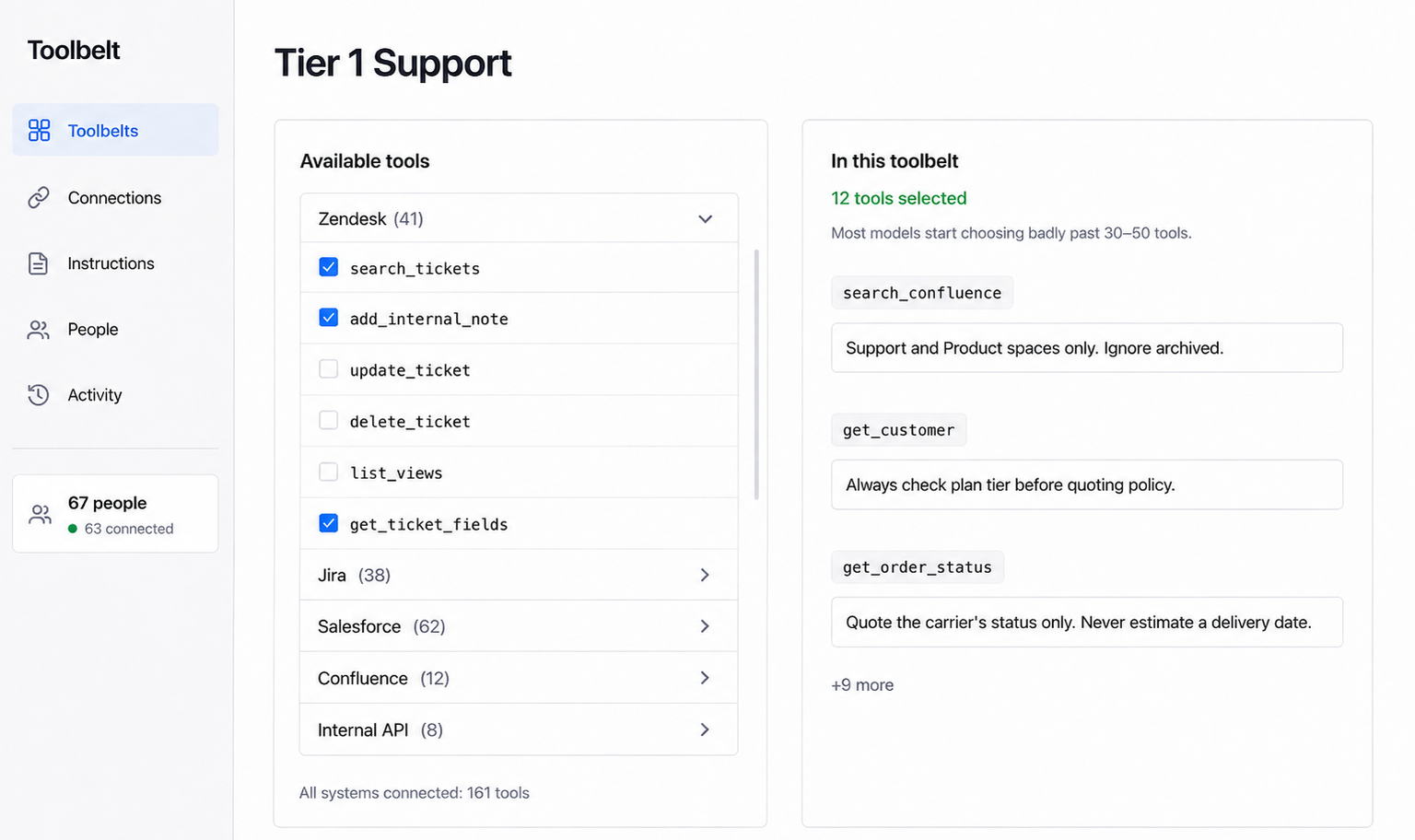
A toolbelt builder for Tier 1 Support: available tools grouped by system on the left with checkboxes, and 12 selected tools as chips on the right with a note that most models start choosing badly past 30–50 tools.

A toolbelt holds only what that role actually needs. Tier 1 gets ticket search, customer lookup and order status. Escalations gets the issue tracker and the logs. Connect everything to everyone and the AI is choosing between a hundred and fifty tools, which is where it starts picking the wrong one.

Each tool carries your instructions with it, so "search the docs" means "Support and Product spaces only, ignore anything archived" without anybody having to say so.

3. Everyone connected, with their own permissions.

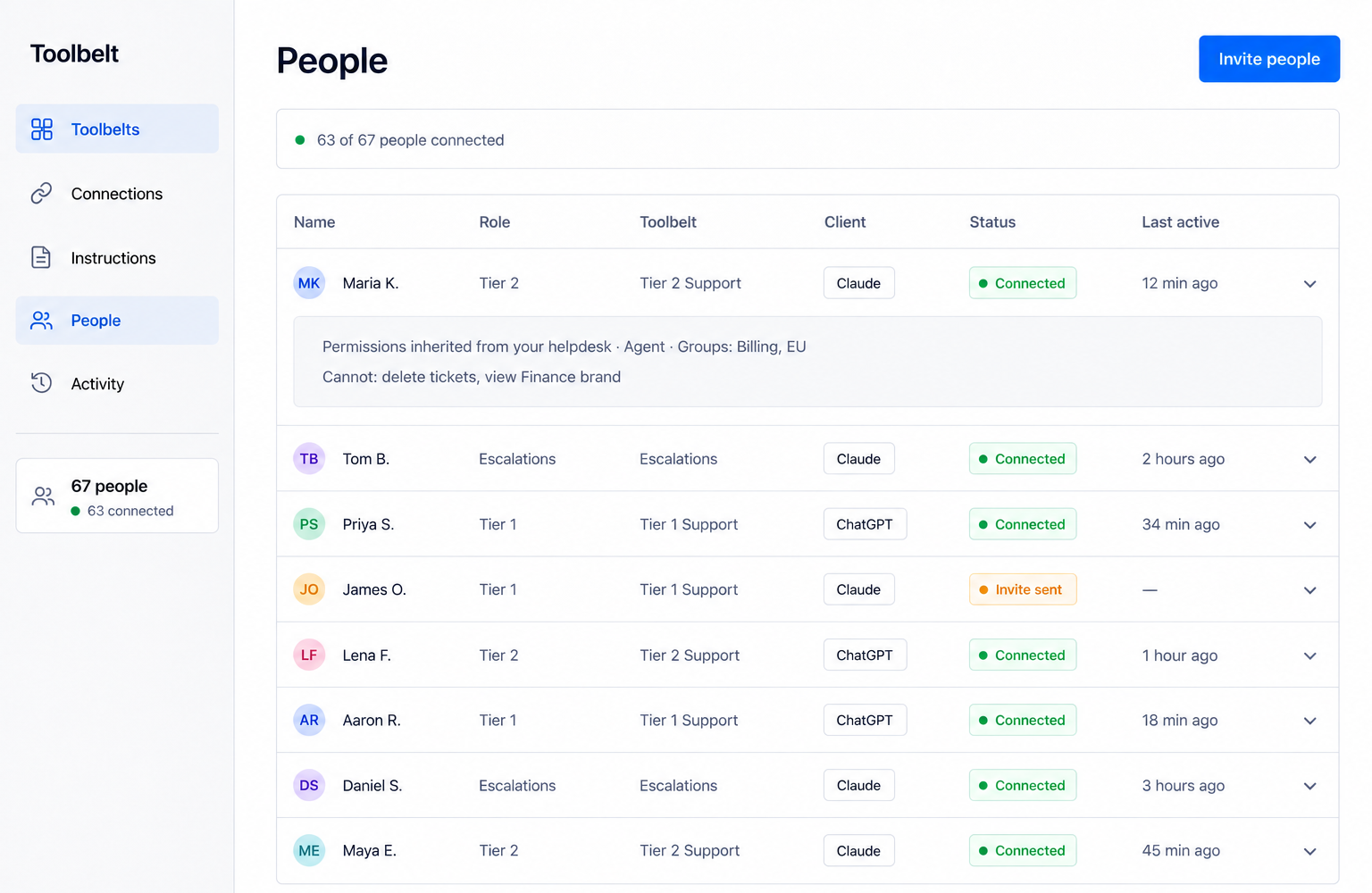
A People table listing agents with their role, toolbelt, AI client, green Connected status pills and last active times, plus an expanded row showing permissions inherited from Zendesk.

Fifty agents across three systems is a hundred and fifty individual setups, so the rollout stalls at the two people who already knew how — or somebody pastes one shared admin token into everyone's config, and a tier 1 agent's AI can suddenly do things that agent never could.

With Toolbelt each person connects as themselves and inherits the permissions they already have in every connected system. A new starter is scoped correctly on day one without anybody setting anything up for them.

4. Everything the job needs. Full context in, real work out.

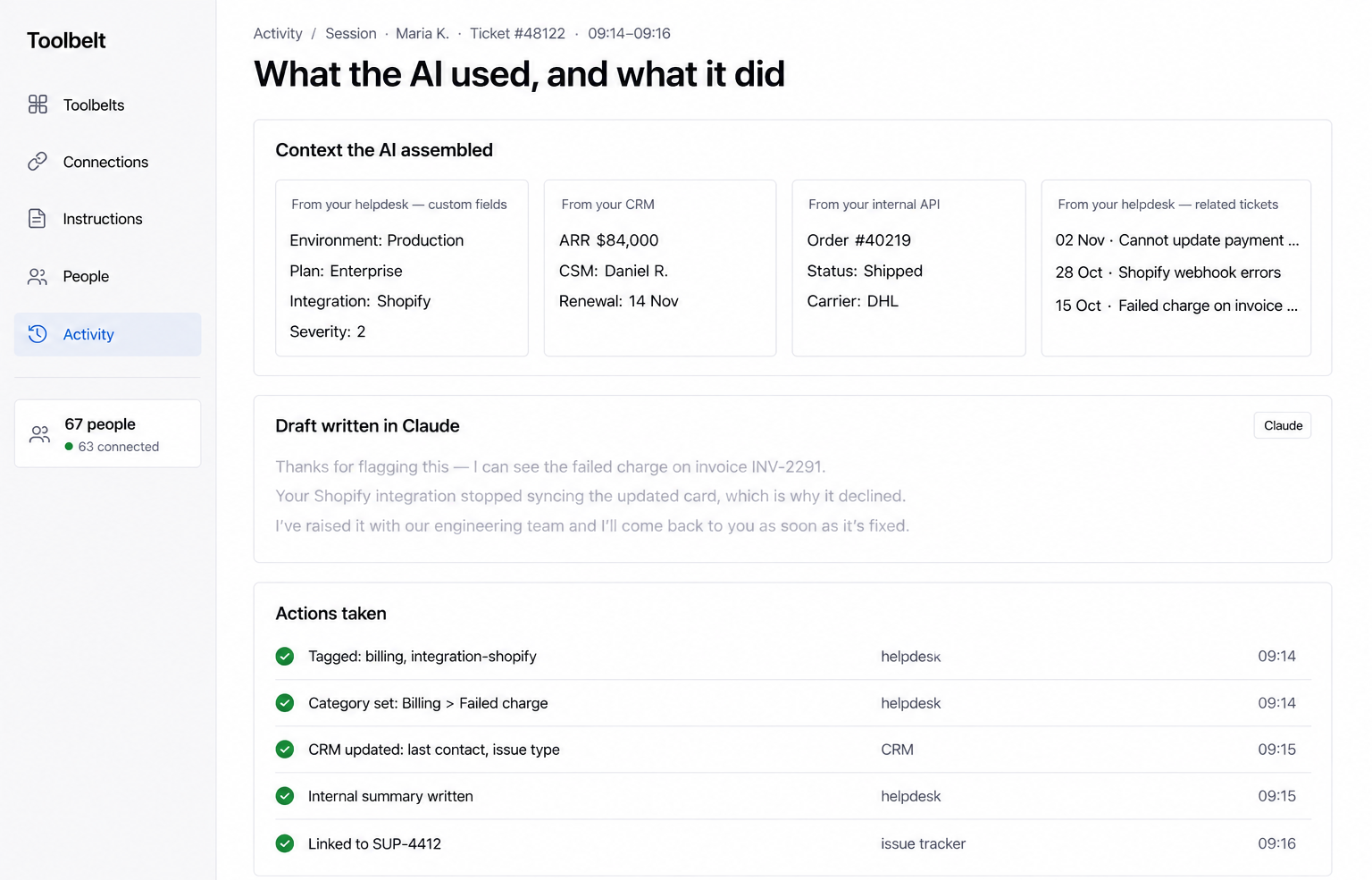
A single ticket view showing context assembled from custom fields, the CRM record, order state and related tickets, a greyed draft reply, and a list of completed actions with green ticks and timestamps.

Your AI reads the conversation and writes a decent reply. It never sees the custom fields, the CRM record, the order state or the related tickets — and it stops at the draft, leaving the tagging, the CRM update, the summary and the bug ticket to the agent. The hours didn't go down, they moved to cleanup.

Toolbelt covers both ends, scoped per role. Tier 1 gets the reads and the safe actions. Escalations gets the rest.

5. A record of everything the AI read and did.

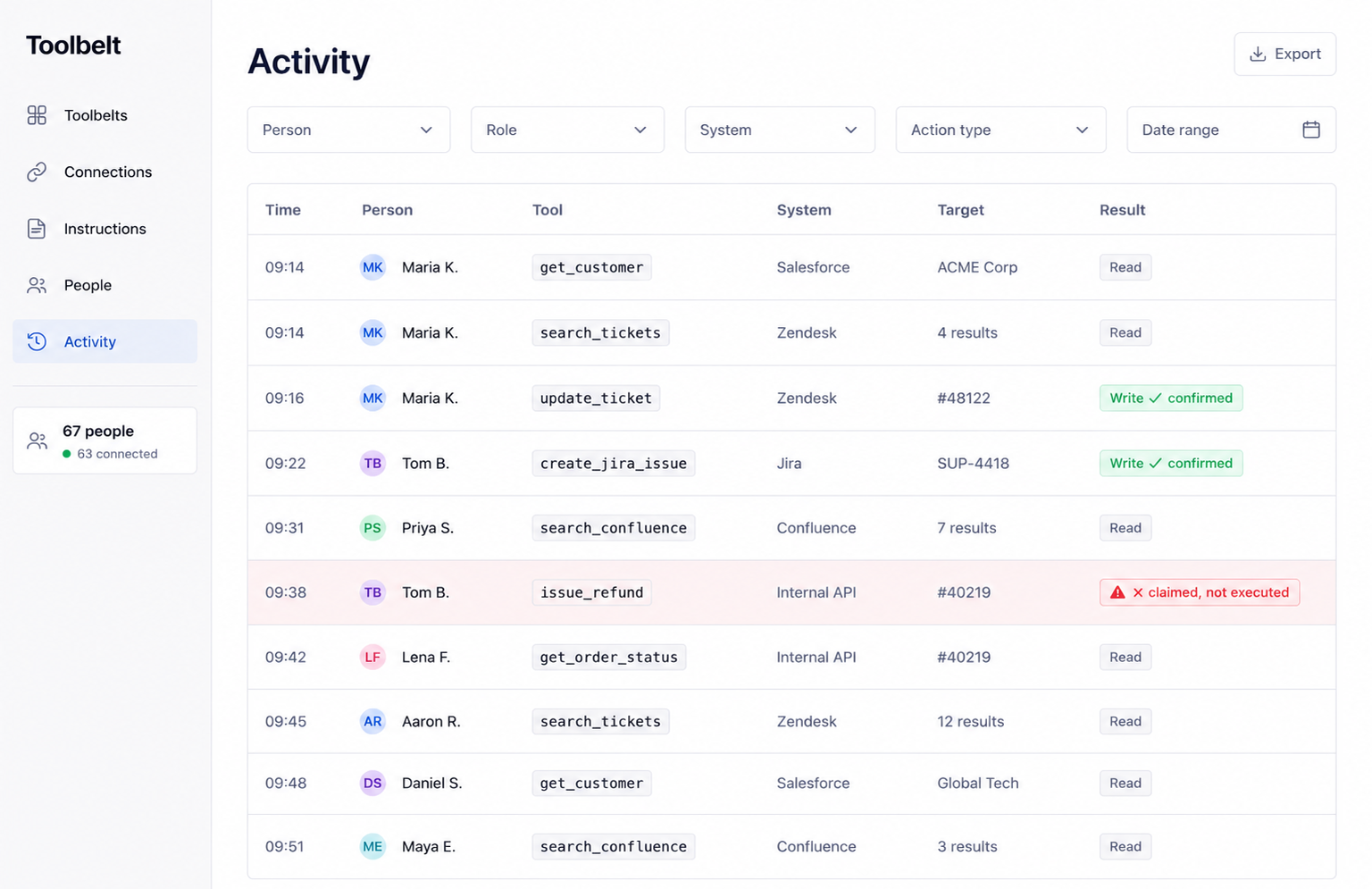
An Activity log table with filters and columns for time, person, tool, system, target and result, including one row flagged in red as claimed but not executed.

One log across every connected system: who asked, what the AI reached for, what it changed, when. Hand it to security without assembling it from six places first.

Every action the AI claims it took is also checked against whether the tool call actually ran — so "your refund is on the way" is either true or flagged, rather than a perfect-reading reply you find out about when the customer writes back angry.

6. Choose what leaves your helpdesk.

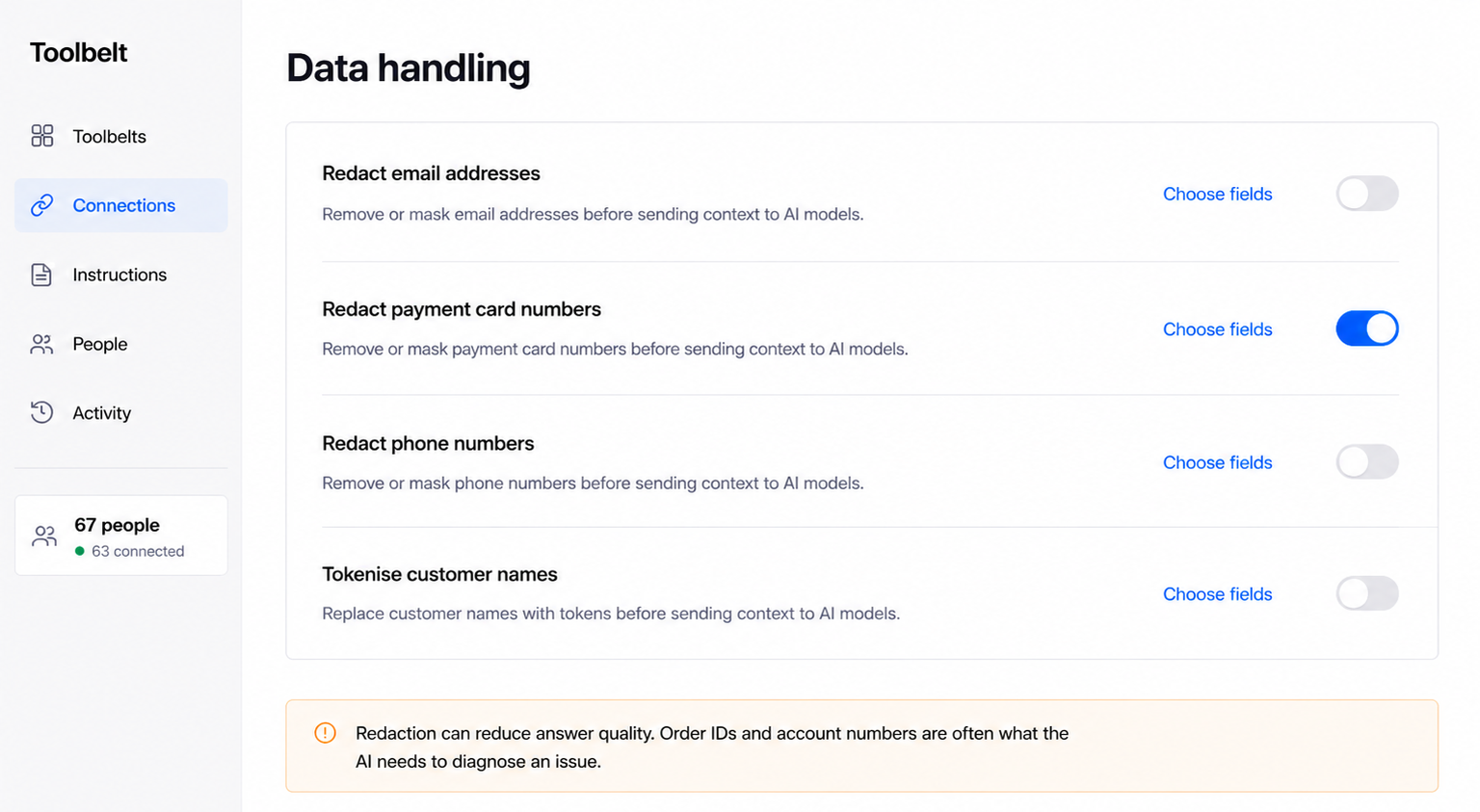
A Data handling settings panel with toggles for redacting email addresses, payment card numbers, phone numbers and tokenising customer names, plus an amber note about the trade-off.

If your team needs certain fields kept away from the model, redact or tokenise them before anything leaves your helpdesk.

The trade-off is real: the order number, the account ID and the email address are frequently the exact things the AI needs to work out what went wrong. Turn it on where you need it, not everywhere.

The obvious question

"Why not just connect the MCP servers directly?"

For one person, do. It works, and it's free. This exists for the point where you want your whole team on it.

Connecting MCP servers yourselfToolbelt
SetupEach person, each system, one at a timeConnect once, everyone inherits
Who can do itWhoever can edit a config fileAnyone with a link
CredentialsUsually one shared admin tokenEach person authenticates as themselves
PermissionsEverybody gets everything the token allowsEverybody gets what their role allows
ToolsAll of them, all the timeOnly the ones that role needs
InstructionsEach person writes their own, or noneWritten once by ops, applied for everyone
When someone leavesFind and revoke every token they heldRemove them once
Record of activityWhatever each client happens to logOne log across every system

There's no native option for some of this yet. Zendesk announced an MCP server in May 2026 for "early access this summer" and it hasn't shipped. Anthropic's centralised connector auth is in beta, covers seven connectors, and none of them are support tools. And none of them touch the part that matters most: which tools your role should have, and how your team wants them used.

How it works

Three steps, and only the first one is yours to do twice.

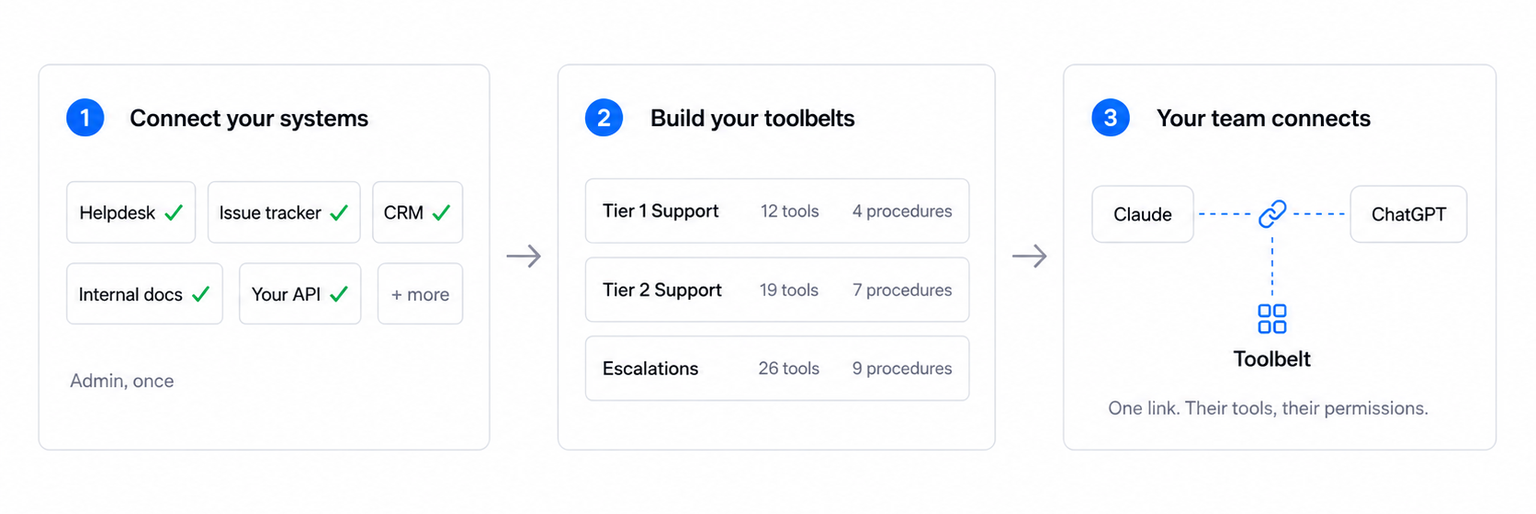
A three-panel diagram: connect your systems (helpdesk, issue tracker, CRM, internal docs and your API, each with a green tick), build your toolbelts (Tier 1, Tier 2 and Escalations with tool and procedure counts), and agents connect (Claude and ChatGPT linked to Toolbelt with one link).

1. Connect your systems once. Your helpdesk, CRM, issue tracker, internal docs and your own internal APIs. An admin does this a single time.

2. Build a toolbelt for each role. Pick the tools, write the instructions, add the procedures. Start from templates for tier 1, tier 2 and escalations, then change them to match how your team actually works.

3. Send your team a link. They connect the AI client they're already using. They get their tools, their permissions and your instructions, without setting anything up.

Who this is for

Support teams big enough to have a support ops function.

  • Support organisations of roughly 20 to 200 agents, where somebody already owns macros, triggers, views and internal documentation
  • Teams where at least one person has already connected an AI assistant to the helpdesk and it's working well for them
  • Support ops, support systems admins and knowledge managers who are being asked to roll that out to everybody
  • Teams running a helpdesk alongside a CRM, an issue tracker, internal docs or their own internal tools
  • Anyone who has looked at a shared API token in a config file and felt uneasy about it

This probably isn't for you if your team is under ten people, in which case connecting the MCP servers directly works fine and you don't need us. Or if you're looking for an AI agent to answer customers instead of your team, which is a different product entirely.

What we're not

Honest framing, so you know what to expect.

  • We're not an AI agent. Toolbelt doesn't talk to your customers or decide what your team should say. It gives whichever AI your team already uses the right tools and instructions.
  • We're not a replacement for Zendesk AI, Fin, or your deflection tool. Those answer customers. This equips your people.
  • We're not another chat interface. Your team keeps using Claude or ChatGPT. Nothing new to learn.
  • SOC 2 Type 2 certified badge

    Swifteq is SOC 2 Type 2 certified

    The infrastructure Toolbelt runs on is audited annually.

  • Built by Swifteq

    The team behind 14 Zendesk apps, used by hundreds of support teams.

  • We already run the Zendesk MCP server

    Free, used by hundreds of support teams, listed on the Zendesk Marketplace.

FAQ

The questions we get asked most

Twenty minutes on your setup.

Tell us which systems your team runs and how they're using AI today. We'll walk through how toolbelts get scoped for roles like yours, and answer whatever you want to ask.

"Not ready to talk? Leave your email and we'll send you what we learn."